CI/CD Pipeline Security: A Step-by-Step Hardening Guide
Your CI/CD pipeline routinely has credentials to your cloud account, your container registry, and your production deployment target — often more standing access than any individual engineer has. It's also usually the least-scrutinized part of the stack, because it's infrastructure, not a product feature. That combination is exactly why supply-chain attacks target the pipeline instead of the application.
Here's how to actually harden each stage, not just the parts that are easy to talk about in an audit.
Stage 1: Commit — stop secrets before they enter history
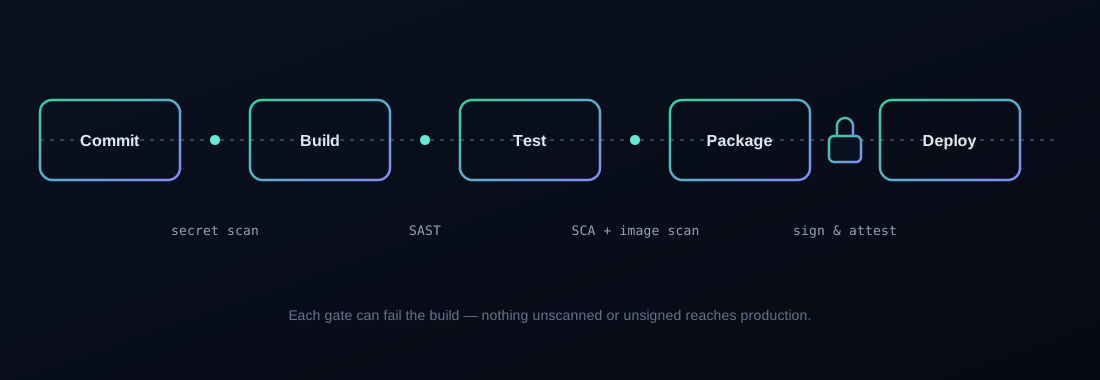
Once a secret is committed, it's in git history forever, even if you delete it in a later commit. Run secret scanning (Gitleaks, TruffleHog, or your platform's native scanner) as a pre-receive hook or a required CI check on every push — not a nightly scan that finds the leak after it's already been pushed to a public fork.
Stage 2: Build — validate what you're pulling in, not just what you wrote
Most vulnerabilities in production code aren't in code your team wrote — they're in dependencies. Run Software Composition Analysis (SCA) as a required check, and pin dependency versions with lockfiles rather than floating version ranges, so a compromised upstream package can't silently change what gets pulled into your build.
This is also where SAST (static analysis of your own code) belongs — as a required, blocking check, not an informational report nobody reads.
Stage 3: Package — scan the image, sign the artifact
Before an image gets pushed to a registry, scan it (Trivy, Grype) and fail the build on critical/high vulnerabilities. Then sign it — with Cosign or your registry's native signing — so that anything deploying from that image can cryptographically verify it came from this exact pipeline run and hasn't been tampered with between build and deploy.
Unsigned images are a real gap: without signing, anything with registry push access can overwrite a tag, and nothing downstream would know the difference.
Stage 4: Deploy — least-privilege credentials, always
The deploy stage typically needs the most powerful credentials in the entire pipeline — and those credentials sit in a CI system that also runs arbitrary pull-request code in many configurations. Scope deploy credentials as narrowly as the target environment allows, use short-lived tokens (OIDC federation instead of long-lived static keys wherever your cloud provider supports it), and never let untrusted pull requests (from forks, from external contributors) run with deploy-stage secrets in scope.
Stage 5: Runtime — verify what's actually running matches what was signed
Admission controllers (Kyverno, OPA/Gatekeeper) can enforce that only signed, scanned images are allowed to run in your cluster at all — closing the loop so that even if someone bypasses the pipeline and tries to deploy directly, the cluster itself refuses an unsigned image.
The pipeline-poisoning pattern this defends against
This entire structure exists because of a well-documented attack class: an attacker doesn't need to break your application if they can get anything injected into the pipeline that builds and deploys it — a malicious dependency, a compromised GitHub Action, a poisoned build step. Once that's in the pipeline, it inherits all the pipeline's access. We go deep on exactly this failure mode in our research on GitHub Actions pipeline poisoning — this guide is the practical, defensive counterpart to that research.
Build this for real
Reading the stages is one thing. Actually wiring secret scanning, SCA, image signing, and admission control into a working pipeline — and watching a poisoned build actually get blocked — is the hands-on core of our DevSecOps Masterclass.
Discussion
More from the blog

Top DevSecOps Interview Questions (and How to Actually Answer Them)
Real DevSecOps interview questions, and what separates a memorized textbook answer from the answer that actually gets you hired.

Kubernetes Roadmap for Security Professionals
A practical guide to planning skills, projects, and next steps for security professionals moving into Kubernetes and cloud-native roles.